Quick answer
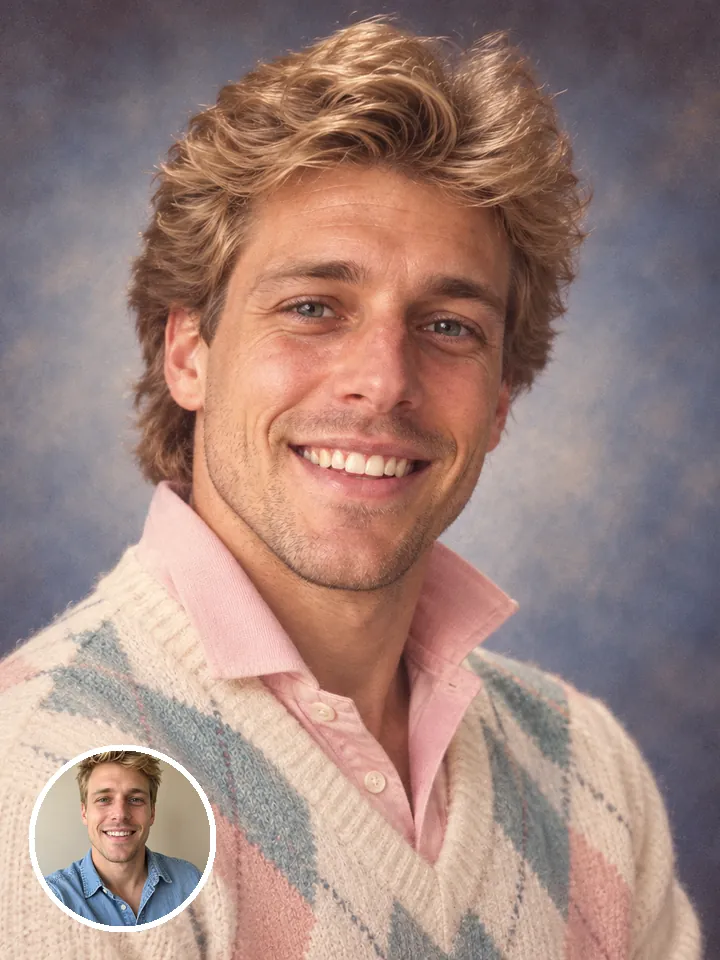
Open 80s Yearbook AI, upload a sharp, well-lit picture of your face and press make. You get two square pictures of you as a 1980s school portrait: big feathered hair, clothes from the decade, a laser or mottled blue backdrop and soft flash and film grain. It costs 4 credits, and a new account’s welcome credits pay for it.
The AI yearbook trend first went viral in October 2023. A paid feature in the photo app Epik turned a handful of selfies into a set of portraits styled like a 1990s American high-school yearbook, and timelines filled with frosted tips, denim and awkward smiles. News outlets covered it within days, and plenty of people paid for the pack just to join in.
It never fully went away. Every school-photo season brings it back, and the searches have drifted a decade earlier: the 80s version, with bigger hair and the laser backgrounds that school photographers loved, is the one people now ask for by name.
What makes it look 80s, not 90s
1980s
Feathered or permed hair with volume, popped collars, sweater vests, shoulder pads, big glasses, a laser-beam or mottled blue backdrop.
What our template does
1990s
Curtain bangs and frosted tips, flannel and denim jackets, chokers, a plain grey or cloudy backdrop.
What the 2023 Epik wave looked like
The backdrop does most of the dating. Swirly blue canvas and neon laser streaks say 1980s at a glance, even before anyone looks at the hair. Soft flash and a little film grain finish it, because school portraits of the time were shot on film under a single strobe.
The photo to start from
- Face toward the camera, eyes open, in daylight or even indoor light.
- No sunglasses, hats or heavy filters: your face has to stay readable while the hair around it is restyled.
- Shoulders in view if you can. A cropped chin gives the new collar nothing to sit on.
- Any clothes. The outfit is replaced with one from the decade.
Ask for nothing specific and you get a classic look. If you want a mullet or a perm, use the chatbot prompt below and say so; the template chooses the hairstyle for you.
Step by step on Reelfie
- 1Open the 80s Yearbook AI page and add one photo where your face is sharp and well lit. To share the portrait with someone, add a second photo of them.
- 2Square is the default and what a yearbook page looks like. Portrait and vertical are there for Stories.
- 3The button shows the cost before anything runs: 4 credits for two pictures. A brand-new account’s welcome credits cover one photo trend; that first result carries a small watermark until you buy a pack.
- 4Press make. It takes a minute or so, and a run that fails returns the credits.
- 5Save both pictures from Assets. Post the better one beside your real selfie, or both as a before-and-after carousel.
Free with ChatGPT or Gemini
Both chatbots can do this on their free tiers, within daily image limits. Attach your photo and paste a prompt that names the decade’s details; a vague “make me 80s” tends to give a costume party rather than a school portrait.
Make this person’s 1980s high-school yearbook portrait. Keep their face exactly as it is in the photo. Give them voluminous feathered hair, a collared shirt under a sweater vest, and a soft smile. Shoulders-up framing, a mottled blue studio backdrop, one soft flash from the front, gentle film grain and slightly faded colour. No text, no borders.
Swap the sweater vest for shoulder pads or a varsity jacket, or the backdrop for “neon laser beams”, to change the year. If the face drifts, ask it to redo the image keeping the original face, rather than starting a new chat.
Common problems
It doesn’t look like me
Use a sharper photo, front-on and unfiltered. A face shot from below or half in shadow gives the model too little to keep.
The hair is too much
That’s the decade. Make it again for a second pair; the style changes run to run.
One of us looks less sharp than the other
Use two photos taken in similar light, so both faces come out with the same flash and grain.
There is a watermark
Results made with the free welcome credits carry one. Pictures made after your first credit pack don’t.
FAQ
What is the AI yearbook trend?
Turning a selfie into a retro school yearbook portrait with AI. It went viral in October 2023 through the Epik app’s 1990s-style yearbook feature and returns every autumn.
How do I get an 80s yearbook photo with AI for free?
On Reelfie (reelfie.app), a new account’s welcome credits cover one photo trend, so the 80s Yearbook AI trend costs nothing the first time, with a small watermark. Or attach your photo to ChatGPT or Gemini with a prompt that names the 1980s details.
What app did the AI yearbook trend use?
The 2023 wave came from Epik, a photo editing app, as a paid in-app feature.
Can I do an AI yearbook photo with my partner?
Yes. On Reelfie, add two photos, one of each of you, to the 80s Yearbook AI trend, and you appear together in the same portrait. It costs the same 4 credits.
Does the AI yearbook photo have my name or a school on it?
No. It is just the portrait, with no text. Add your name in the caption.
Make your first one
80s Yearbook AI: Big hair, laser backdrop.
Try 80s Yearbook AIYour photos are deleted 7 days after upload and never used to train AI.