Knight Cat AI Generator
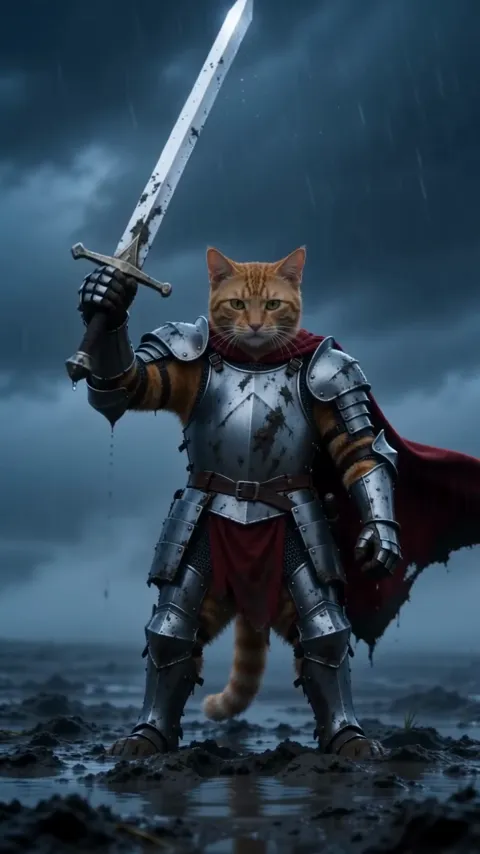
Your pet, in armor, pulling a sword from the mud.
- 10-second video
- Vertical or widescreen
- With the trend sound
- Ready in 3 to 5 minutes
- Armor in the rain
- Sword from the mud
- Lightning close-up
Your photo
By adding a photo you confirm everyone in it is 18+ and agreed to have their face used for this. We use faces only to make what you ask for. How we handle faces
Video size
Quality
- Not charged if it fails
- Private till you share
- Photos gone in 7 days
What is the Knight Cat AI trend?
Knight Cat AI turns your pet into a tiny knight on an empty moor at dusk. Fog rolls across the wet grass, rain slants sideways, and there your cat or dog stands, upright on its back legs in a long crimson cape over polished, battle-scuffed silver plate armor. Its own furry head stays bare, so it’s unmistakably your pet. Beside it, a steel longsword stands point-down in the mud, taller than the knight itself.
Slowly, the camera pushes through the fog. Your pet grips the hilt in both front paws and wrenches the blade free of the mud with one strong pull, rain and mud spraying, then raises it toward the sky. The last shot is a low close-up: wet fur, rain running off its whiskers, its eyes narrowed, staring fearlessly past the camera at something huge in the distance while lightning flickers in the clouds.
The 10-second clip comes in 9:16 vertical for TikTok and Reels or 16:9 widescreen for a longer post. Your pet is the only knight on the moor: no people, no other animals, just one small hero against the weather. It’s epic, a little ridiculous and very much your pet.
Updated
- TikTok, Reels
- #knightcat
- For pets
In the 10 seconds
Where Knight Cat AI started
Knight Cat started with an Instagram AI artist who posted a kitten-versus-dragon series in August 2026 starring a tiny armored kitten. The clips went viral as reaction videos in late September 2026, mainly on X. Pet owners then started turning their own cats into knights.
Since September 2026
How to make the Knight Cat AI video
Three taps on your side. The rest happens on ours.
 1
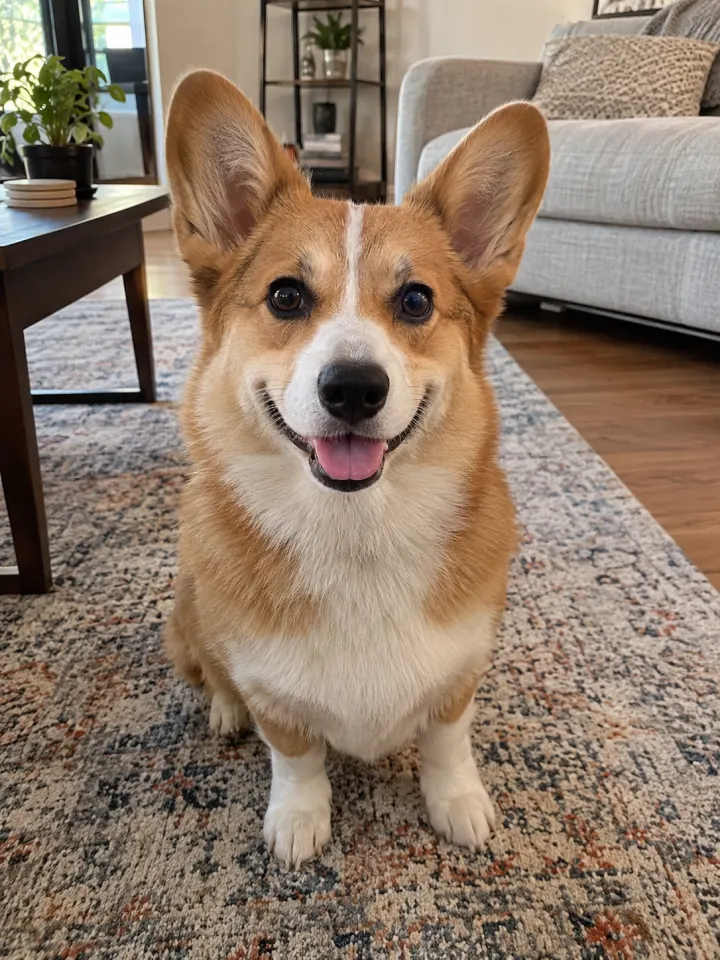
1Add a photo
Your pet, face clear and toward the camera.
 Make my videoKnight Cat AI2
Tap Make my video
No prompt to write. The trend’s moves and music are built in.
- MP4 with soundShare link#knightcat3
Post it
Download it with the trend sound and tag #knightcat.
What you add, what you get
One Knight Cat AI run, from the photo in to the file out.
You add
- One photo of your cat or dog
- No prompt to write
- JPG, PNG or WebP, up to 10 MB
You get
- A 10-second Knight Cat AI video starring your pet
- Vertical or widescreen, your pick
- HD 720p or standard 480p, with the trend sound
- Ready in 3 to 5 minutes, credits back if it fails
- Private until you share it; no watermark after your first purchase
Best photo for Knight Cat AI
Face the camera in good light. The clearer the face, the more it looks like your pet.
Works
Heavy filter
Too dark
Blurry
Face too small
- Pet’s face clearly visible
- Whole body in frame
- Good light on its coat
- Blurry action shots
- Two pets in one photo
- Hats or outfits on it
Ideas to try with Knight Cat AI
Who to put in it, and what to say when you post it.
Sir Whiskers, reporting for duty. #knightcat
Trend soundWho to make it for
- Gotcha day honorsKnight your pet on its adoption anniversary. It earned the title.
- Birthday knightingPost it on your pet’s birthday with a royal title in the caption.
- Pet account introPin it as your pet’s profile video. Nothing says guardian of the house like plate armor.
- After the big battlePost it the day your pet finally stood up to the vacuum cleaner.
Caption ideas · tap to copy
Knight Cat AI questions
The short answers. Ask a person or visit the help center.
Does it work for dogs too?
Yes. Any pet works if its face and coat are clear in the photo. It keeps its own breed, size, markings and eye color under the armor.
Can I be in it?
Not in this one. Your pet is the only knight on the moor, and that’s the whole joke: one small hero, one big storm.
Is my pet’s face covered by a helmet?
No. Your pet’s head stays bare in every shot, so its face, ears and whiskers are all its own.
Is Knight Cat AI free?
Not free, but you can try Reelfie first: every new account gets one photo trend free, no card needed. Knight Cat AI itself starts at $9.90 for a credit pack, with no watermark once you buy, and a run that fails costs nothing.
How much does Knight Cat AI cost?
100 credits in HD (720p), 50 in standard (480p). A pack from $9.90 makes 1 in HD or 3 in standard, and a plan from $16.58/mo, billed yearly, makes 4 in HD a month. The Make button shows the total before it runs, and a run that fails gives the credits back.
What app makes the Knight Cat AI video?
Reelfie (reelfie.app) makes it from one photo, with no prompt to write: the trend’s look is built in. It costs 100 credits, shown before it runs, and a run that fails costs nothing.
Is Reelfie the official Knight Cat AI app?
No. Knight Cat AI is a trend, and no app owns it. Reelfie (reelfie.app) is independent, not affiliated with TikTok, CapCut or the trend’s creators; it makes your own version from your photo.
Can I make Knight Cat AI with ChatGPT, Gemini or CapCut?
Partly. ChatGPT and Gemini can write a prompt, and AI video tools, CapCut’s included, can turn a photo into a clip from it, usually after a few tries and with a watermark on free tiers. They don’t know this trend’s scene or timing. Here both are built in, so one photo is all it takes.
How long does it take?
Most videos are ready in 3 to 5 minutes. You can close the page; the video keeps going and waits for you in Assets.
Can I make it with my cat or dog?
Yes. Choose Your pet and upload a photo where your pet’s face is clear and facing the camera.
Why does the face not look like me?
Usually the photo: side angle, low light or something covering the face. Try a clear front photo. If one doesn’t come out, you are not charged.
Can I post it on TikTok?
Yes. The video is vertical with the trend sound, and after your first purchase it has no watermark. Pick the trend’s sound when you post and your video also shows on that sound’s page.
Who can see my video?
Only you. It stays private in Assets until you create a share link.
What happens to my photos?
Your photos are deleted 7 days after upload and never used to train AI.

One photo.
Your pet in Knight Cat AI.
Knight Cat AINot charged if it fails